|
WA8LMF Home Page | Main Ham Radio Page | Main Links Page | Updated 2 Feb 2025 |
The files linked below contains disk images that can be used to re-create a compact disk containing audio files to test and compare the performance of standard 1200 baud VHF packet radio TNCs under various conditions.
Two versions are provided. The original version 1.1, released in 2009, creates an audio CD. The new version 2.0 creates a normal computer CD-ROM.
Both files are images of optical disks. The CD-audio Version 1.1 is in the .BIN/CUE file format. (Normal .ISO-format image files can't capture the multi-session mixed-format layout of this disk.) Version 2 is a normal CD-ROM layout in .ISO format. Either version can be used to burn a physical CD on a standard CD-R blank disk, using the freeware "ImgBurn" utility. The contents of the audio files in both versions are identical - they are lossless audio files, but in different formats.
Version 2 can also be "mounted" and used as a virtual CD-ROM using an unused drive letter on your system.
NOTE: Windows 8 and later, can mount an ISO as a virtual drive natively. Right-click the .ISO file name in the Windows File Explorer. Choose "Open With..." and select "Explorer". The contents of the ISO will "auto-magically" appear as a new drive letter on your system.
Older versions of Windows will require you to install a third-party mount utility such as "WinCDemu" . Once installed, you can right-click the ISO file in the File Explorer, and choose "Select Drive Letter and Mount..." from the pop-up context menu.
To aid in selecting the cuts on a CD-ROM drive that lacks a front-panel track-number indicator, voice announcements and cue tones have been added to the beginning and end of each track.
Track 1 has a DTMF digit "1" at the beginning and a DTMF digit "6" at the end.
Track 2 has a DTMF digit "2" at the beginning and a DTMF digit "7" at the end.
Track 3 has a DTMF digit "3" at the beginning and a DTMF digit "8" at the end.
Track 4 has a DTMF digit "4" at the beginning and a DTMF digit "9" at the end.
Track 5 has a DTMF digit "5" at the beginning and a DTMF digit "0" at the end
The differing digit values could possibly be used with a DTMF decoder to automatically start or stop data acquisition devices.
Note that all these recordings are taken directly from the discriminator. Tracks 1, 3 and 4 are not de-emphasized. Track 2 is de-emphasized (see below). If you wish to evaluate how various TNCs behave when connected to a radio's speaker or headphone output (rather than directly to the discriminator such as from a 6-pin mini-DIN "data" jack.), you will have to insert an RC de-emphasis network between the CD player and the device under test.
For an excellent discussion on FM pre-emphasis and de-emphasis, and how it relates to packet operating and TNCs, visit this website:
http://www.febo.com/packet/layer-one/transmit.html
Track 1 is an off-the-air recording of 40 minutes of
activity on 144.39 MHz in Los Angeles, California, during the afternoon rush
hour at about 5:00 PM when the channel is totally saturated to several hundred
percent of the Aloha threshold. This recording was taken from the
non-de-emphasized direct discriminator output of a Yaesu FT-1500 via the 6-pin
mini-din data connector. It contains a variety of over- and under- deviated
signals, packet collisions, rapid-fire packets with practically no pause
between them, raw NMEA string trackers, TinyTraks, clueless idiots using CW ID
on packet, etc. All periods of dead air over about 1 second have been edited
out so that 40 minutes of real-life activity have been compressed to 25
minutes on the CD.
This track is intended to be played back directly into TNCs to compare the
performance of various TNCs "under fire" in the real world . The rapid pace of
the packets should be a good test of the ability of buffers in TNCs and
associated applications to hand a rapid flow of data without overrunning.
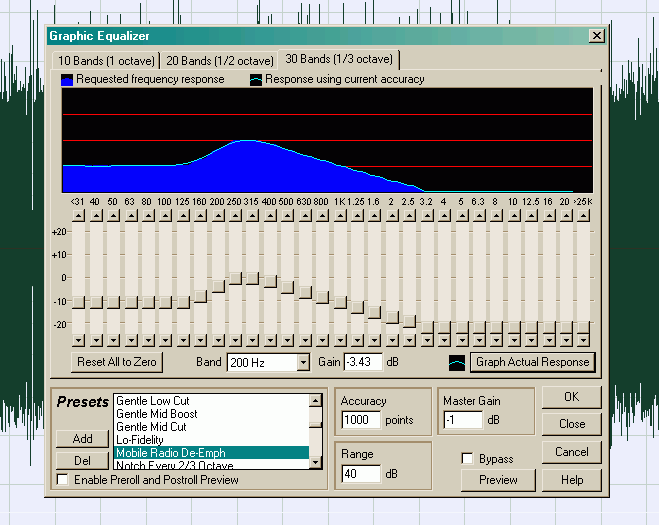
Track 2 is identical to Track 3 except that a precise 6db-per-octave/20db-per-decade de-emphasis between 300 and 3000 Hz has been applied to simulate the typical de-emphasis found at the volume control or speaker output of the typical land-mobile receiver. This can used to evaluate the relative performance of TNCs in handling raw non-deemphasized discriminator audio vs de-emphasized speaker audio. The effectiveness of jumper-selected equalization networks available inside some TNCs can also be tested. This track was created by applying the graphic equalizer filter in Adobe Audition set to simulate the standard EIA land-mobile radio de-emphasis curve.
Note that a roll-off was also applied below about 200 Hz to simulate the typical highpass filtering used to keep CTCSS ("PL") tones out of the speaker of mobile radios.
The three following tracks are for TNC alignment rather than testing. They are intended to evaluate TNC demodulator tolerance to tone "skew" (unequal levels of the 1200 and 2200 Hz tones).
Track 5 is a direct recording of one minute of a KPC3+
TNC in the "CAL" mode sending the alternating 1/0 test pattern (i.e. alternating
between 1200 and 2200 Hz tones) with both tones at the same amplitude.
Track 6 is the same recording with a precise 6
dB/octave 20 dB/decade de-emphasis applied as in Track 3 above.
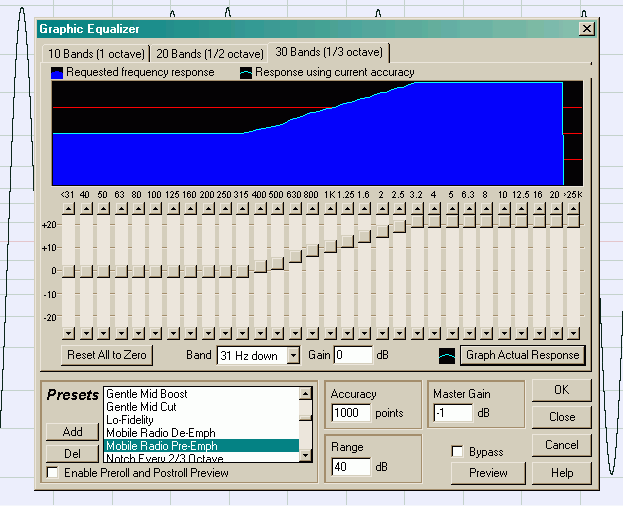
Track 7 is the same recording with a mirror-image precise 6 dB/octave 20 dB/decade pre-emphasis applied.
These are examples of what the flat response, pre-emphasized response and de-emphasized responses of the KAM test tones look like:. They were captured with the freeware "Visual Analyzer" soundcard software oscilloscope and a Behringer UCA-202 USB soundcard.
FLAT Response PRE-Emphasized DE-Emphasized
WARNING! Please DO NOT play these test tracks over-the-air! My callsign is embedded in the beacons and will be igated. This will create false reports of where I was decades ago!Keep your testing confined to a dummy load. |
READ THIS FIRST !!!The image file contained in the first download link below produces a MIXED MODE disk that combines audio CD tracks and CD-ROM data tracks.
The second link is to an ISO image of a normal CD-ROM |
Most CD-recording applications, including Nero, CDburnerXP and others can re-create a physical disk from these types of image files. You do not place the .BIN or .ISO file in a list of files to be recorded as you typically do. Instead, pull down "File" from the menu bar, and look for something like "Record image file..." or "Make CD from image file...".
The original mixed-mode CD was created with the freeware program CD Burner XP available at:
The image file was created from the physical CD with the freeware program ImgBurn available at:
WARNING! These are large downloads (over 530 megabytes for the BIN version and around 250 megabytes for the .ISO version).