WA8LMF Home Page | Main Ham Radio Page | Main APRS Page | Updated 28 June 06


Updated APRS Symbol Set (Rev H)

Updated 28 September 2005

The symbols in this set are a composite of the original G4IDE set provided with UI-View and the U.S. customary symbols  used by WinAPRS, APRSplus, Findu and APRSworld, etc. including the latest suggested changes by WB4APR.   (The "U.S. customary" set was originally designed years ago by KH4G for use with JavAPRS and findu.com.) 

Note that for web display purposes, the images are presented in GIF format. For actual use in UI-View, UI-Point and APRSplus, the images have to be in 256-color BMP format.  For use by JavAPRS and Findu, they have to be 256-color PNG format.

Zip files containing this revised character set in formats ready for use with 

are downloadable from links farther down this page.  

Click Here to download a text file summarizing the symbol assignments by letter. This list, derived from the original list provided in UIview and heavily modified and updated, is useful for selecting the symbol letter code in TinyTraks, TNC trackers and Kenwood D700/TH-D7s. 

Click here for a printable APRS Symbols reference chart, including the actual icons, in Acrobat PDF format.

A standard APRS-format position report looks like:
             !3612.34N/11518.95W>  
The latitude and longitude are expressed in degrees, minutes and decimal fractions of minutes, not degrees-minutes-seconds. (This is the standard NMEA format for lat/long output by GPS receivers, and is also the default format for APRS.) Thus the example above says  "36 degrees 12.34 minutes north latitude" and "115 degrees 18.95 minutes west longitude".  

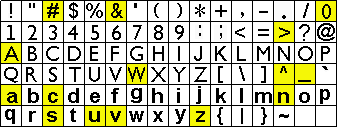
The character after the latitude (emphasized in red above) determines if the symbol to be displayed is from the primary set or secondary set below.  The character after the longitude (emphasized in green above) determines which symbol out of the selected set will be displayed.   The example above says to use the primary set,  and to select the red car in the third position from the right in the second row ( the character " > " and the car are in the same position in the two tables). 


Grid of the text codes used to represent APRS symbols in the standard position format.

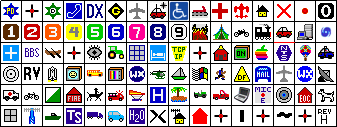
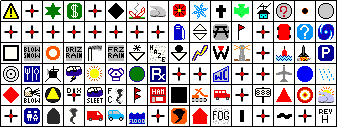
Choosing a character from the table above causes the symbol in the corresponding position from one of the tables below to be displayed. The cross-hair symbols occupy symbol slots that have not yet been assigned. 

Primary Symbol Table - Selected by placing " / " between Lat and Long

Secondary Symbol Table  - Selected by placing  " \" between Lat and Long

Overlaid Symbols

Some of the secondary table symbols can have an alphanumeric overlay.  The alternate symbols that can have an overlay are highlighted in yellow  in the text grid above.  The overlay character can be a single digit 0 through 9 or letter A through Z.  It is placed in the position after latitude instead of " \ ".

NOTE:  Many APRS applications don't properly implement the overlay technique. In such programs, you will see the base symbol from the secondary set, but not the overlaid character or digit. 

This will be most obvious with new generation digipeaters that use the solid green star in the secondary set overlaid with a letter to indicate capability, instead of the traditional star with fixed "D" from the primary set. 


Updated Symbols for UI-View

This zip file contains the revised symbol set for the main UI-View program.   These symbols are laid out in the same  20x20-pixel-per-symbol grid used by the original symbols supplied with UI-View,  but the icons have been re-sized to 16x16 pixels which tends to cover up less of the underlying map. Especially in crowded urban areas, symbols overlap less and maps look better with the smaller icons. 
     UI-View has a feature that allows the installation of alternate symbol sets without overwriting the original symbol files called "SYMBOLS.BMP" and "SYMBOLS2.BMP".  If a user places alternate files named MYSYMB.BMP and MYSYMB2.BMP in the main UI-View program directory, UI-View will use these symbols instead the next time the program is started.  The zip file  linked below contains these alternately-named files. Just unpack the zip file into the main UI-View directory. 

Download --> UIview-MySymbols-RevH.zip  <-- Download


Updated Symbols for UI-Point

The UI-Point add-on for UI-View allows APRS position reports to be displayed on Microsoft MapPoint 2002 or 2004. UI-Point has it's own symbol set, located in the main UI-Point program directory,  completely separate from the symbols in UI-View.   Normally the UI-Point symbol files are identical to the main ones in UI-View; i.e. "SYMBOLS.BMP" and "SYMBOLS2.BMP". UI-Point does not support the "MYSYMB" alternate symbol set described above for UI-View.  Therefore, updating UI-Point requires overwriting the original files with like-named files. Back up the originals before unpacking the zip file below which contains files identical to the ones above, but named "SYMBOLS.BMP" and "SYMBOLS2.BMP" instead of  "MYSYMB.BMP" and MYSYMB2.BMP"

NOTE:  UI-Point does not properly support the overlaying of characters on top of the symbols in the secondary set the way UI-View itself does. As a result, symbols such as WIDEn-N digipeaters which should show as a WHITE letter "N" overlaid on the solid green digi star in the secondary set will appear as just the green star alone. The same issue applies to overlaid WX stations (blue circle), overlaid numbered cars, numbered boats, etc.

Download -->  UIpoint-SYMBOLS-RevH.zip <-- Download


Updated symbols for APRS+SA  a.k.a. "APRSplus".

The zip file below contains the same updated symbol set in a format compatible with APRSplus and will overwrite the original symbols. Back up the originals before unpacking  the zip file.

NOTE 1:  APRSplus does not properly support the overlaying of characters on top of the symbols in the secondary set. As a result, symbols such as WIDEn-N digipeaters which should show as a WHITE letter "N" overlaid on the solid green digi star in the secondary set will appear as just the green star alone. The same issue applies to overlaid WX stations (blue circle), overlaid numbered cars, numbered boats, etc.

NOTE 2:  The APRSplus original symbol set was created when far fewer symbols were "officially" defined, especially in the secondary set. As a result, many of the symbols available for selection were ad-hoc improvisations of the program author and would only appear the same way on another copy of APRSplus.  Some of the symbols such as the red,white and blue USA outline, sputtering bomb and various others will no longer show.
     Further, some of the text captions in the icon-selecting dialog will be incorrect.  The correct code for the selected symbols will be transmitted, only the local text description of the icon will be wrong. (The text labels for the symbols come from a table embedded in the main program executable file. This table could be altered with a binary or hex editor if desired.)

Download -->  APRSplus_Symbols-RevH.zip <-- Download


Updated symbols in JavAPRS/Findu format.

The zip file below contains the same updated symbol set in the PNG format used by JavAPRS and Findu.com. 

Download -->  FINDU-allicons-RevH.zip  <-- Download


This site has been accessed  Hit Counter   times before